Recruitment Pipeline with Airtable and n8n
A staffing-agency data model in Airtable, kept fed with live listings from the Remotive API by an n8n workflow — every write is an upsert, so the import can run on repeat without ever creating a duplicate.
The problem
A staffing agency's pipeline has a real relational shape: clients have job openings, candidates apply to openings (often more than one), and a successful application becomes a placement. Modeling that badly — flat tables, free text where a relationship belongs — makes the data unreliable the moment more than a handful of records exist.
On top of the data model, job openings need to stay current. Re-typing listings from a job board by hand does not scale and drifts out of date immediately. This project is both halves: a properly related Airtable base, and an n8n workflow that keeps one of its tables fed automatically — safely, since re-running an import is something that will happen by accident sooner or later.
The data model
Every relationship is a linked-record field rather than a copied-in name, so a client's details live in exactly one place. Applications exists as its own table specifically because Candidates and Job Openings are many-to-many — collapsing that into a direct link would lose per-application data like applied date and stage. Placements is kept separate from Applications because a placement is a business event (a start date, a fee), not just an application status.
Fields are typed rather than left as free text wherever a structured type fits:
single selects for status and category, native date fields for posting and applied
dates, and a Record Source field (Sample / Remotive) on Clients and Job
Openings that keeps hand-entered data and API imports separable in views and rollups.
A rollup on Clients counts open positions per client; a lookup surfaces the client
through the chain from Application → Job Opening without needing to click through.
UNIQUE constraint that the
database enforces outright. That gap, and how the rest of the schema would translate
to Postgres — keys, constraints, indexes — is written up in the README linked below.
How the import works
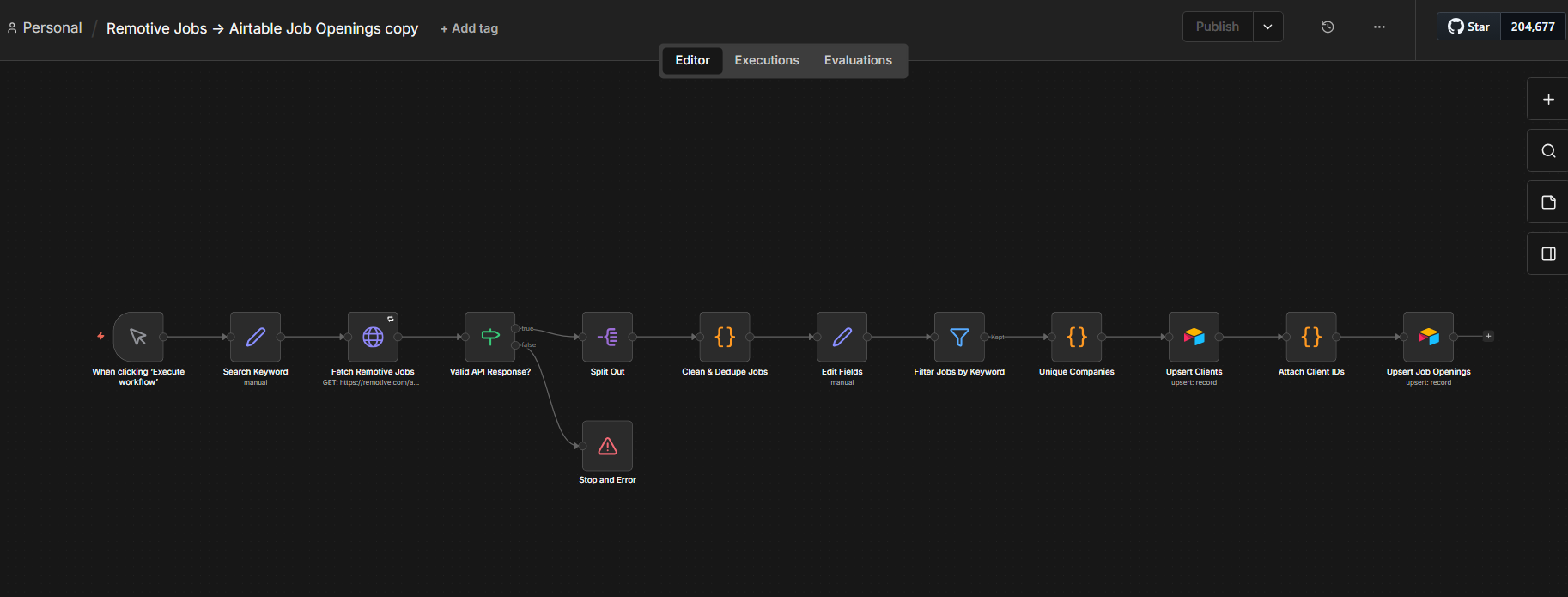
A single editable keyword
One Search Keyword node holds the search term and feeds both the
Remotive API call and a downstream filter — change it in exactly one place, not two.
That filter turned out to matter more than expected:
search parameter — querying it with a nonsense term returned
the same listings as a real one. The workflow still sends the parameter (correct per
the docs, and it will start working again if Remotive restores server-side filtering),
but the keyword is also enforced client-side against the job title, category, tags
and description before anything reaches Airtable.
Deduplication, two layers
Within a single API response, a Code node drops any repeated job id before it goes
further. Across separate runs, both Airtable writes use the native
create-or-update operation rather than plain create: Job Openings
match on Remotive's External Job ID, Clients match on company name. A
second run of the same import updates existing records instead of duplicating them —
verified by comparing the Airtable record IDs returned by two consecutive runs and
finding them identical.
Error handling
Three mechanisms, deliberately layered for two different failure modes. The fetch
node retries up to three times with a five-second wait and a fifteen-second timeout,
which catches a dead or unreachable API. A validation gate then checks that the
response actually contains a usable jobs array before anything touches
Airtable, which catches an API that answers 200 OK with the wrong shape
of data — a page that fails politely instead of one that fails loudly, or worse,
silently writes nothing at all.
What I would add next
- A schedule trigger instead of manual, with a dedicated n8n Error Workflow sending a notification on failure
- A "last seen" timestamp per import so listings that vanish from Remotive get auto-closed
- Structured salary parsing into numeric min/max fields for real rollups
- Promoting imports into their own linked table if the volume grew enough to warrant it
Source
Full write-up (schema reasoning, the Postgres/SQL comparison, setup steps), the n8n workflow export, the Airtable base, and a short walkthrough video:
| Airtable base | Open (read-only) |
| n8n workflow | Download JSON |
| Full write-up | README |
| Walkthrough | Watch on Loom (5 min) |